Geoff Alday

Product Design LeaderPrototyperBuilder

I help teams create new products and evolve platforms in complex environments where the answer is rarely clear upfront.

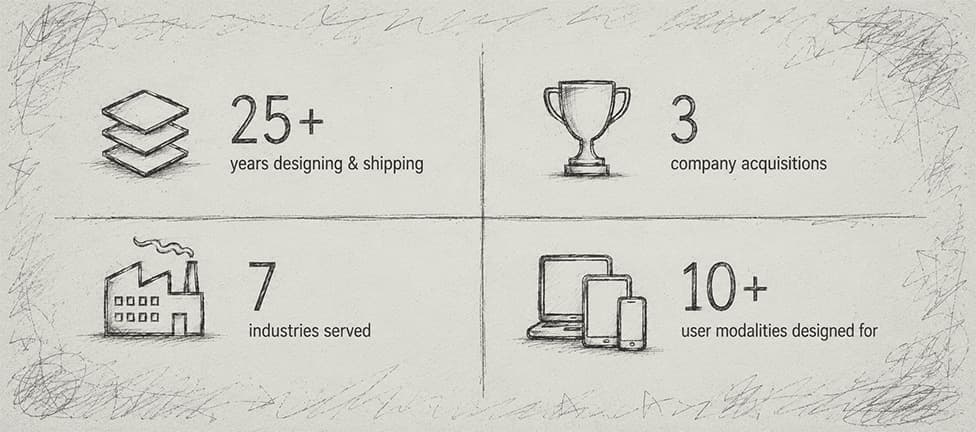
I've worked as the founding or sole designer at multiple companies and inside larger design and product organizations.

I partner with leadership to shape strategy, launch products used by millions, scale the business, and reach successful acquisitions.

Lirio logo

In progress

Reshaping how we build software at Lirio in an AI-native environment

A discovery tool that reduces requirement sprints to afternoons. A platform evolution that opens our agentic capabilities to external agents via A2A and MCP. An end-to-end agentic development process from research through deployment. Each with the premise: AI isn't a feature, it's a shift in how work gets done.

Rooster logo

Shipped an AI-curated morning paper app in 8 days, solo.

Rooster is an AI-curated morning paper that uses a multi-step LLM pipeline to assemble news, weather, and content in a warm Southern voice. I designed and built the whole thing, shipping a functional prototype in eight days and the MVP two weeks later — roughly 75 hours across early mornings, nights, and weekends.

Try Rooster
Lirio logo

Cut content approval time 75% and unlocked revenue blocked by a spreadsheet.

Lirio's behavioral science content lived in one 50-column spreadsheet that blocked every client launch and delayed revenue by months. I designed a custom CMS — four months, zero to production — that gave teams one source of truth, cut approval time 75%, and turned a bottleneck into a pipeline.

Lirio CMS

Walkthrough of Lirio CMS MVP.

Lirio CMS

Problem

Lirio used behavioral science content to help people overcome barriers to scheduling critical health appointments, including mammograms, colonoscopies, and vaccinations. But under the hood, that content lived in massive spreadsheets, sometimes 50+ columns wide, duplicated and modified for every client's brand, compliance, and legal requirements. It could take two to three months just to get a client's content approved, and most contracts prevented billing until messages were actively sending. The spreadsheet process was literally blocking revenue. To make things worse, those same spreadsheets fed our AI system, so structural errors directly hurt message quality and delivery.

Solution

I led the design of Lirio's first user-facing product: a custom CMS built for behavioral science and optimized for AI-driven content selection. Rather than just digitizing what already existed, I pushed us to step back and understand the full content lifecycle. I interviewed teams across the company (behavioral design, AI engineers, platform engineers, and client onboarding) to map the end-to-end workflow and find where things were actually breaking.

A few patterns surfaced quickly: content was being written in one tool, pasted into spreadsheets, and cleaned by hand. Errors like missing links and content mismatches were making it to production. Clients frequently rejected or modified behavioral messages with no way to track that feedback. And the tags driving AI selection were inconsistent, which made it harder for the system to reliably compose personalized messages.

From there I sketched a new flow that combined writing, reviewing, activating, and collaborating into a single system, then validated it through prototypes with content designers, reviewers, AI and platform engineers, and folks from client success and onboarding. Their feedback shaped some of the most useful features: live previews of how messages would render in email and SMS, structured content fields linked directly to activation logic, approval workflows with clear state changes and audit trails, and behavioral science tooltips that explained the intent behind each message type.

The MVP shipped four months after kickoff. It included a structured content model aligned with AI-driven interventions, built-in review and approval workflows, live previews, role-based collaboration with version control, integration with activation pipelines to cut engineering handoffs, and a set of reusable UI components that became the foundation of a real design system.

One of the more rewarding moments came after launch, when one of the content designers told me, "Thank you for creating my dream content tool." I'll take that one to the grave.

Impact

Reduced content creation time by more than 50%

Reduced client approval time by 75%

Eliminated launch delays caused by content composition errors

Strengthened the reliability of AI-driven content selection by removing inconsistencies in the source content

Unlocked earlier revenue by accelerating message activation

Created a scalable foundation for future intervention tooling and the broader design system

Team & Responsibilities

I was the principal and sole product designer on this project. I partnered closely with our head of development, technical architect, product manager, internal engineers, contract developers, and user groups across the content, AI, onboarding, and platform teams. My responsibilities included user research and stakeholder alignment, information architecture and content modeling, workflow and UI design, high-fidelity prototyping and interaction design, and implementation guidance for engineers.

Time Period

Mar 2020 – Jul 2020

Watershed logo
A Watershed learning analytics dashboard with five reports: a training assessment bar chart, CSAT growth comparison, a learner activity stream, a CSAT correlation scatter plot, and a top-performers ranking.
Image 1 of 8

Took a learning analytics platform from PoC through acquisition.

Watershed defined a new category of learning analytics built on the xAPI standard. I was the principal designer and product owner from day one, shaping 15 report types, the dashboard system, and the data tooling that powered enterprise pilots with Google, AT&T, and Visa and carried the platform to acquisition.

Watershed

Webinar of Watershed's UI refresh.

Watershed

Problem

A learning technology leader needed use cases to show the market how a new technical standard (xAPI) for corporate training data could be used in ways the market couldn't imagine. Clients had been living with the current standard (SCORM) since the early 2000s, with a long history of being constrained by its limited capabilities.

Solution

When I joined Watershed, the product was a login screen and two reports that had to be loaded by a developer. Over my time there, I helped design and launch essentially everything that came after: dashboard creation, design, and management tools; 15 customizable report types; custom data visualizations; report filtering, configuration, and sharing tools; data ingestion, transformation, and debugging tools; and administrative settings.

Working with pilot clients like AT&T, Google, and Visa, we designed, developed, and launched a new product category for the learning and development market: the learning analytics platform. By building out real, practical use cases with these clients, we showed the market what xAPI could actually do and grew the client base from there.

A genuinely hard part of this was that we weren't just building a new product; we were creating the market for it. A lot of my time went into designing product concepts meant to get prospects excited about what was possible with the platform and the company behind it. I can't share those concepts due to NDA, but they were some of the most interesting work I did there.

One of my favorite things I designed was the Activity report. The idea was that a user could configure it around a single learning activity (such as an assessment) and get back a wealth of information about how it was performing. Figuring out the right visualizations for that one was a lot of fun.

Impact

We grew the client base from a handful of pilots to a roster that included AT&T, Google, and Visa, among others. More broadly, the work helped establish the learning analytics platform as a real product category, one that's now integrated into many corporate learning solutions and, in some cases, displacing traditional business intelligence tools for L&D use cases. I'm proud to have played a part in making that real.

Team & Responsibilities

I worked with a team of eight engineers on this project. I was the principal product designer and also served as product owner. Responsibilities included product management, user research, information architecture, interaction design, visual design, frontend development, and QA.

Time Period

Dec 2013 – Apr 2019

Emma logo
Guestbook running on an iPad Mini held in front of an Emma desktop screen, showing a 'SIGN ME UP!' email signup form.
Image 1 of 13

Led Emma's iPad app end to end — from native prototype to App Store launch

At Emma, I was lead product designer and product owner on Guestbook, an iPad app that let businesses sign people up for email lists in person. I prototyped the whole app in native code so I could test on real iPads before hiring a developer, which saved budget and landed us with a product customers used on day one.

Emma Guestbook

Walkthrough of Guestbook, Emma's iPad app for in-person email signups.

Emma Guestbook

Problem

Emma's customers wanted a way to sign people up for email lists in person, on an iPad sitting on a counter or carried around at events. The catch: we had no iOS developers or designers in-house, and the core API functionality the app would need didn't exist yet.

Solution

I was genuinely excited when product leadership asked me to lead mobile for Emma, and this was the first thing we tackled. To ground the design in real use cases, I sat down with several local businesses to understand how they'd actually use something like this. From there I started sketching the capabilities people said they needed.

I was heavily into interactive prototyping at the time, so I decided to build this one natively in code. I felt that to really know whether the design worked, I had to test it on an actual iPad. After building the prototype, I carried an iPad around the office running informal usability sessions with anyone who'd give me a few minutes. That surfaced a handful of design tweaks I wouldn't have caught otherwise.

With the prototype in hand, I recruited a contract iOS developer and mobile designer, and shared it with each of them to walk through the functionality and screens, which turned out to be a great way to get accurate quotes back. I worked with finance to secure and manage the budget, and partnered with the API team on the backend work. Once development wrapped, I QA'd across current and previous-generation iPads, fixed a few minor bugs, and coordinated with marketing on the App Store listing and a short launch video.

Impact

The app launched to positive feedback, and Emma customers started using it right away to grow their lists in person, at trade shows, in retail spaces, and at events where capturing an email at the right moment had previously meant a clipboard.

Team & Responsibilities

I worked with outsourced visual designers and mobile developers, Emma's marketing team to produce an intro video and write App Store copy, Emma's finance team to establish an App Store account, secure budget, and pay vendors, and Emma's API team to develop the required backend capabilities. My responsibilities included product management, user research, information architecture, interaction design, prototyping, and QA.

Time Period

2013

Emma logo
Emma's drag-and-drop email editor, showing a mailing in progress with layout, body, content, and sidebar design options.
Image 1 of 5

Designed and launched the first drag-and-drop email editor.

Creating marketing emails used to mean writing HTML or wrestling with rigid templates. I led design on the first drag-and-drop email editor, which became a category standard and shaped how people build email. Every major email platform since has adopted the pattern, and most still use it today.

Emma Email Editor

Walkthrough of early prototype of Emma's drag-and-drop email editor.

Emma Email Editor

Problem

Emma needed a fundamentally better way for customers to build emails. The existing editing experience had real limitations, and the broader market hadn't yet produced an interactive drag-and-drop email editor. We wanted to be first.

Solution

This was my first big project at Emma, and I was asked to take it on as Product Owner and Lead Designer. Like all my projects, it started with research. I pulled together a core team of internal stakeholders representing the different types of Emma customers, then dug into what people loved about the current editor and, more importantly, what they wished they could do but couldn't.

With that grounding, I ran several design sprints with the other designers at Emma. We generated a lot of interaction ideas for what a more interactive editor could feel like. Once we landed on patterns and functionality that felt genuinely exciting, I created mockups of the initial workflow, handed them to the team for estimates, and used those to build out a roadmap, define feature sets, and plan development sprints.

There was a parallel need on the other side of the product, too: Emma's email design team had to be able to upload and manage the templates customers used. I mocked up that workflow and handed it off to a separate internal development team to scope and build.

One of the more fun parts of this project was sharing progress in our weekly staff meeting. Rather than just talking about what we were building, I started putting together short videos as the product matured. People responded really well to them, and there were even occasional cheers, which I won't pretend wasn't gratifying.

Impact

This shipped as the email marketing industry's first interactive drag-and-drop email editor: a pattern that's now table stakes across nearly every email platform on the market. Internally, it changed how Emma's customers built campaigns: less wrestling with HTML, more focus on the message. It also became a recognizable differentiator in Emma's positioning during a competitive period for the category.

Team & Responsibilities

I led a team of five designers on this project. I also served as product owner, creating requirements and setting priorities for internal and external development teams through collaboration with cross-functional stakeholders. My responsibilities included product management, user research, information architecture, interaction design, and QA.

Time Period

2011